






















How to add the Bluffton Icon to your iPhone home screen

By Paula Pyzik Scott, editor
[email protected] / 567-400-4266
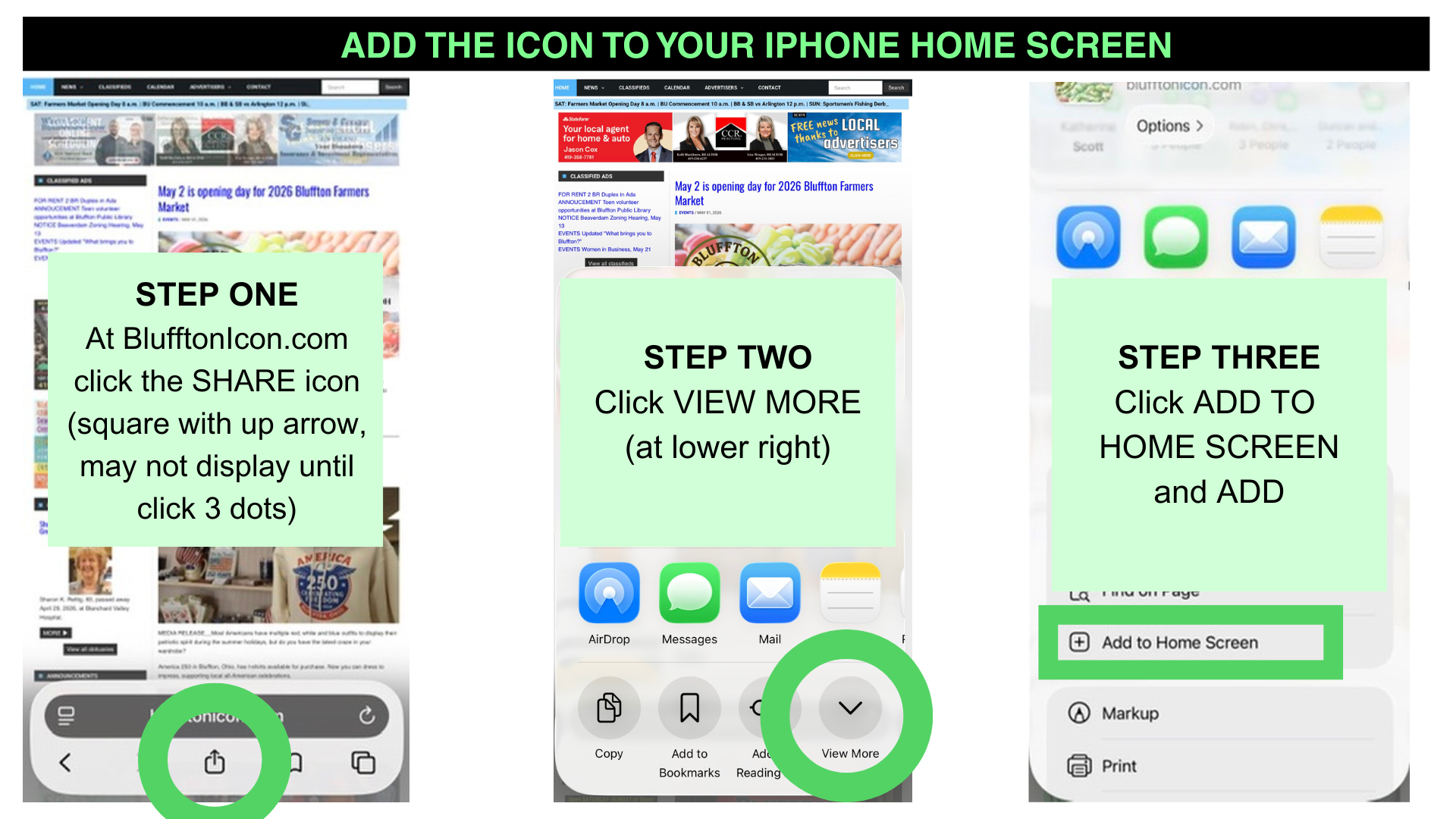
While reporting at recent local events, I've enjoyed showing readers how to add a Bluffton Icon icon to their iPhone home screens. See the graphics above and the instructions below to create an easier way to access BlufftonIcon.com's free news, updated daily.
1) Open BlufftonIcon.com in your browser (Safari, Chrome, DuckDuckgo, etc.). Click the SHARE icon (square with up arrow). This option may be under three dots, depending on your phone size.
2) Click VIEW MORE (down arrow at lower right).
3) Click ADD TO HOME SCREEN and click ADD.
Stay tuned for Android instructions.
Best wishes and thank you for reading the Bluffton Icon!
Stories Posted This Week
Monday, October 19, 2026
- Ada Icon headlines, October 19
- JessExpress Travel is the Icon's newest advertiser
- Gatchel 7th in girls, Pirates 4th at NWC cross country meet
- Veterans invited to Pandora-Gilboa banquet, November 10
- October 19 Bluffton Schools athletics lineup, streaming
- Wearable sculptures featured in exhibit On Soft Ground
- Historic depot rentals offered for meetings and parties
Sunday, October 18, 2026
Saturday, October 17, 2026
Friday, October 16, 2026
- Production offers a modern take on the story of St. Clare of Assisi
- Bluffton volleyball edged in 5 by Van Buren
- Pirate girls soccer tie O-G
- Bluffton Council recap: Officers honored for 25 years of service
- Bluffton Clean Up teams up with Troop 3256 Cub Scouts
- Ada FFA: Feeding the Farmers
- Nov. 7 Fall Community Day at Bluffton University
- Quarry Farm Nature Preserve news for Fall 2026
Thursday, October 15, 2026
- DeWine announces $200M Rural Health Transformation program award
- Herb program with Marge Lafollette, Oct. 15
- Prairie seeding activity at Bluffton University, October 24
- Food for thought: Choline for the brain
- Results for 5K on October 2, Bluffton University Homecoming event
- 15 minutes with Sherry Miller, senior center activities coordinator